

Honestly, recruiting teams don’t have time to babysit software. They need a system that moves fast, keeps candidates engaged, and makes their day easier, not harder. That’s where an ATS (Applicant Tracking System) comes in — the secret sauce behind recruiters that run like well-oiled machines.
But here’s the problem: not all ATS are built equally. Some are sleek, smart, and simple. Others? Let’s just say they still feel like they belong in 1900s.
And with the North American ATS market growing 10% year over year, it’s harder than ever to tell what’s hype and what’s helpful.
Whether you’re a solo recruiter tired of clunky ATSs or a CEO ready to modernize your recruiting stack, this blog will help you find an ATS that actually works for you, not against you.
Table of Contents
ToggleUnderstanding What an ATS Really Does?
The recruiting process is a massive juggling act: job ads going out, resumes flooding in, interview links flying around, stakeholders asking for updates… it’s a lot. That’s where an ATS comes in — your hiring dashboard, control center and workflow engine — all-in-one.
It’s more than just a digital filing cabinet. An ATS is built to take the chaos out of recruiting by bringing everything together in one place: jobs, candidates, data, communication. It helps the recruiting team stay organized, stay fast, and focus on what matters — finding the right person instead of chasing paperwork.
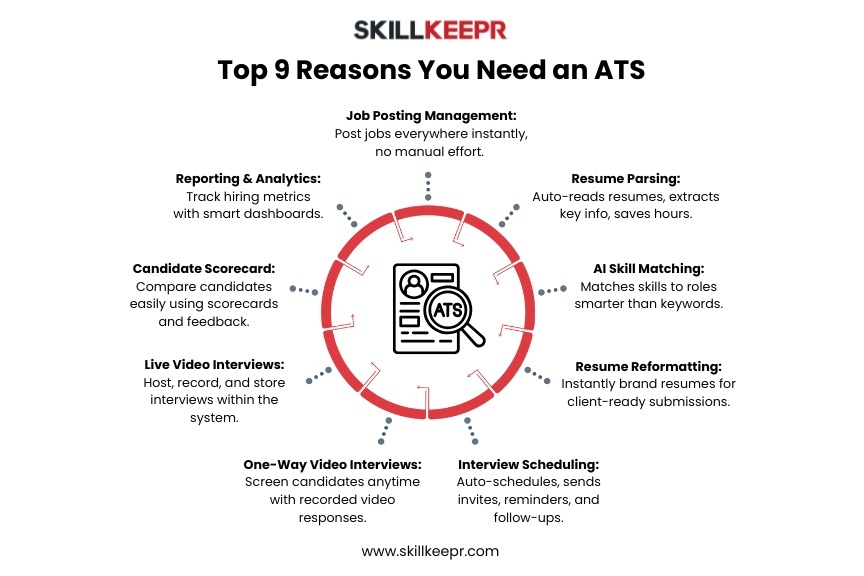
So, what does a modern ATS actually do? At its core, it handles all the pieces of recruitment with automation, analytics, and efficiency:
Job Posting Management: The ATS handles job board syndication and makes your openings go live across channels without manual copy-paste.
Resume Parsing: Resumes come in all shapes and sizes; the system reads them — extracting names, skills, experience — reducing manual work drastically.
AI Skill Matching: Beyond matching keywords, today’s ATS uses AI (link: ) to compare candidates’ skills with role requirements in smarter ways.
Resume Reformatting: Need a candidate’s resume to look agency-branded when you submit to a client? Modern ATS solutions let you reformat instantly, so the document looks professional without you spending 30 minutes tweaking it.
Interview Scheduling & Communication: The system coordinates calendars, sends invites, reminders, follow-ups. No more unlimited email chains.
One-way Video Interview: Candidates record responses to preset questions (so you can screen asynchronously) instead of coordinating live calls for everyone.
Live Video Interview: For those top-tier candidates you want to meet right away, the ATS supports built-in live interviews, records them, attaches to the candidate profile, and logs the data.
Candidate Scorecard: The ATS gives each candidate a scorecard — rating fit, skills, experience, interview feedback — so you can compare them easily across your pipeline.
Reporting & Analytics: Metrics on time-to-fill, source of hire, candidate drop-off rates, pipeline velocity. You get dashboards and insights so you can actually optimise your hiring, not just guess.
By pulling all of those features under one roof, a good ATS reduces manual effort, cuts down on errors and duplicate work, and accelerates the overall recruitment cycle. In short: it frees the recruiting team to focus less on process and more on people.
Why Choosing the Right ATS Matters
Selecting the right ATS isn’t about picking the flashiest software or the one with the most features. It’s about finding the one that fits you.
Here’s the deal:
Efficiency: The right ATS shaves hours off your hiring process by taking care of repetitive tasks. You’ll be amazed how much smoother things run when automation handles the grunt work.
Candidates Experience: A seamless experience — from application to offer — tells candidates you’ve got your act together. It’s a subtle but powerful way to show your culture in action.
Data-driven Decisions: Real-time analytics help you see what’s working and what’s not. You stop guessing and start hiring smarter.
Scalability: Growth is messy, but your ATS shouldn’t be. A scalable system keeps things consistent as your hiring volume increases.
In short, your ATS shapes the first impression candidates have of your company. Choose wisely, and it becomes your secret weapon for attracting top talent — not just another piece of software collecting dust.
Key Questions to Ask Before Buying an ATS
Choosing an ATS isn’t like picking out a new pair of sneakers. It’s a long-term commitment that can either make hiring smoother than ever… or turn into one of those “we should’ve done more research” regrets.
So before signing that contract, ask yourself these questions — the kind that separate a time-saving game-changer from just another clunky tool with fancy buzzwords.
1. Is the ATS actually user-friendly?
Because no one has time for a two-week learning curve. If your recruiters need a manual just to post a job or candidates are ghosting halfway through the application, you’ve got a problem. The right ATS should feel intuitive — like it was built by someone who actually understands what recruiting looks like on a busy Tuesday morning.
2. Does it integrate with your existing tools?
Nothing kills momentum like juggling between five different tabs. If your ATS doesn’t play nice with your HRIS, payroll, or job boards, you’ll end up copy-pasting data until your eyes hurt. A great ATS should connect seamlessly with what you already use, so workflows stay tight, and teams stay sane.
3. How good are the reporting and analytics?
Data isn’t just for executive meetings — it’s your secret weapon for faster hires. Can you see where your best candidates come from? Or which recruiter closes positions the fastest? Your ATS should give you that clarity without needing a data scientist on speed dial.
4. How does it handle candidate data security?
Recruiting means handling a lot of sensitive information. If your ATS isn’t compliant with GDPR or CCPA, you’re one breach away from chaos. Look for encryption, secure storage, and transparent data policies — non-negotiable stuff.
5. What’s the total cost?
Some ATS vendors love to lure you in with “starting at” pricing, only to slap on hidden add-ons later. Always ask:
- Are all the features built-in?
- Are there any add-on costs or consumption-based pricing models?
Sometimes, even basic things like branded career pages or video interviews cost extra.
6. Can it scale as you grow?
Startups don’t stay small forever (hopefully). So, your ATS should grow with you — new users, new regions, new roles, no problem. Look for flexibility without needing to “upgrade” every time your hiring needs change.
7. What makes this ATS more valuable than others?
There’s no shortage of options out there. What separates a great ATS from a crowded market of “me-too” platforms is how much time it gives back to recruiters.
At the end of the day, the best ATS isn’t the one with the longest feature list — it’s the one that makes your team faster, your candidates happier, and your hiring process more effortless.
Red Flags to Watch Out For
While evaluating ATS options, be cautious of the following red flags:
Lack of Customization: An ATS that cannot be tailored to your specific workflows may hinder efficiency.
Poor Customer Support: Limited or unresponsive support can lead to prolonged issues and downtime.
Hidden Fees: Be wary of pricing structures that include unexpected costs for essential features.
Complex User Interface: A convoluted interface can lead to user frustration and decreased adoption rates.
Avoiding these pitfalls ensures that your chosen ATS will deliver the promised benefits without unforeseen complications.
Tips for a Smooth ATS Implementation
When you’ve finally chosen your ATS, then comes the fun part. Implementing a new ATS system can feel like moving into a new house — exciting, but full of boxes, passwords, and the occasional “why isn’t this connecting?” moment.
Here’s how to make the process way smoother and set yourself up for success from day one.
1. Get everyone involved early
Don’t wait until launch day to loop people in. Bring HR, IT, and recruiters to the table from the start. Everyone touches the ATS in some way, and early input can save you from those “we didn’t think of that” moments later.
2. Set a clear, realistic timeline
Treat implementation like a project, not an afterthought. Create milestones — data migration, training sessions, go-live dates — and actually stick to them. Having a timeline keeps everyone accountable and reduces the chaos of last-minute surprises.
3. Train your people
No one likes clicking through 10 tabs wondering what button to press next. Make sure everyone — from recruiters to hiring managers — gets hands-on training with real examples. And keep the sessions light and interactive. The more confident your team feels, the faster they’ll embrace the system.
4. Keep an eye on progress
Check in regularly after launch. Is the system working as expected? Are recruiters using all the features? Don’t wait for frustration to pile up — fix small hiccups before they turn into bottlenecks.
5. Ask for feedback and actually use it
Your users are your best critics. Get their feedback early and often — what’s working, what’s confusing, what could be faster. Use those insights to fine-tune your ATS and make the experience smoother for everyone.
A smooth ATS rollout isn’t about perfection; it’s about progress, communication, and listening to your team. When everyone’s on board and your system fits like a glove, hiring stops feeling like a process — and starts feeling like progress.
Key Takeaways
- Choosing the right ATS isn’t just about features; it’s about finding a system that actually works the way you do.
- The best ATS should make recruiting feel faster, smarter, and more effortless.
- That’s where modern ATSs shine — intuitive, affordable, and designed for recruiting teams
If you’re looking for the best ATS and recruitment solution, check it out here.
FAQs
Companies use an ATS (applicant tracking system) to save time, stay organized, and improve candidate experiences.
No tool is perfect, but many AI-powered ATS solutions include bias-mitigation features: anonymizing resumes, flagging potentially biased job description language, etc. Proper design, oversight, and periodic audits help.
Many modern ATS solutions offer customization options to tailor workflows, job postings, and candidate evaluations to your organization's needs.
Challenges may include data migration issues, user resistance to change, and integration difficulties with existing systems.
Yes, Skillkeepr is a Free Forever ATS and recruitment solution with all built-in, essential features.
The best ATS system aligns with your hiring goals, company size, and workflow. Consider ease of use, integration with existing tools, reporting depth, and scalability.